2026.9.29
Import contacts; knowledge grows itself
Bring your customer list from a spreadsheet or your phone, give each member an email address, and let your knowledge base fill itself from your website and files.
- contacts
- knowledge
- teammates
- messaging
- sms
- calls
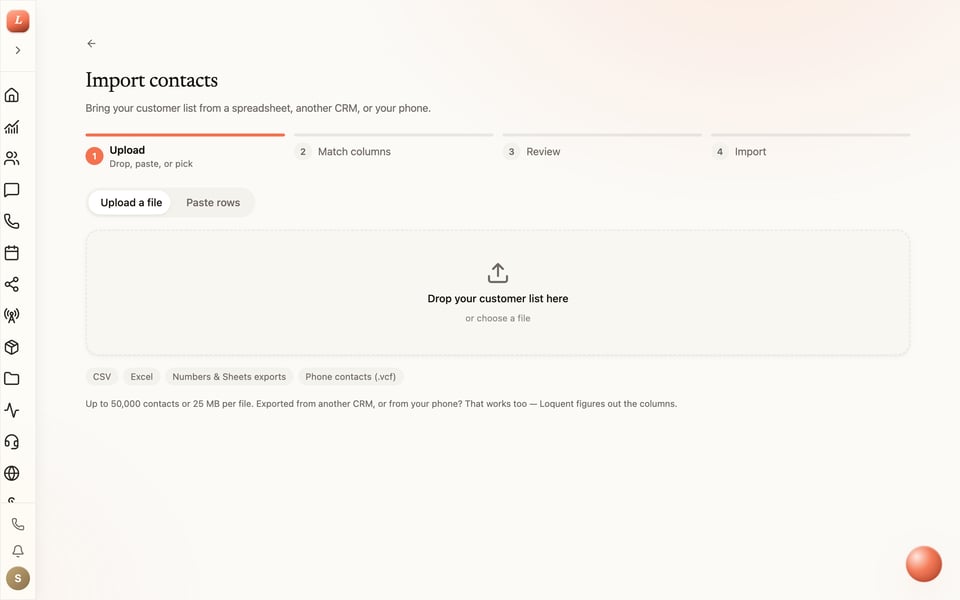
The largest release since launch. Moving to Loquent no longer means retyping your customer list, email comes from the person who sent it, and the knowledge your teammates answer from now grows from your website, your files and the questions they could not answer.
Import your contacts
- Upload what you have — CSV, Excel, Numbers and Sheets exports, vCards from your phone, or rows pasted straight in, up to 25 MB.
- Columns matched for you — Loquent suggests where each column goes (a contact field, a custom field, tags, a note, an opt-out, or nowhere), in English and Spanish, and flags only the columns worth a look.
- See it before it happens — a review step shows exactly what will be created and updated before anything is written. An import never merges contacts, and it needs its own permission.
- Four steps — Upload, Match columns, Review, Import, with live progress and a hand-off to your assistant when it is done.
An email address for every member
- Sent by a person — an Owner can give each member an address of their own. Recipients see the member’s name, and members send only from addresses assigned to them.
- A sending domain of your own — on Pro and above, our team can set up a sending domain for your organization: registered, with its DNS records written and verified for you.
- Delivery you can count on — a failed send is retried without duplicates, and forged inbound mail is turned away.
Knowledge that grows itself
- Import your website — point a knowledge base at your site and its pages become documents, checked again every week so answers stay current.
- Upload files and pictures — PDFs, Word documents, text and CSV files, and photos of a menu or a price board are read into text your teammates can answer from. Long files keep their pages, so an answer can cite “Price list, p. 3”.
- Say what you don’t offer — a Scope card lists what you offer and what you don’t, so a teammate can decline with confidence. Loquent can draft it from your website.
- From a gap to an answer — the questions your teammates could not answer in the last 30 days are grouped in one place. Mark one as not offered, or let Loquent draft the missing document for you to review and approve. Nothing a teammate reads comes from an unapproved draft.
- Conflicts caught first — a document that repeats another, or may contradict it, is flagged with Merge and Keep both. The Scope card warns when a “we don’t offer” entry names a product you sell.
- Answers show their source — and price questions are answered from your product catalog as well as your documents.
Teammates know when to stay quiet
- No reply needed — a “thanks!”, an “ok” or an emoji no longer gets an answer.
- No loops — when a conversation runs at machine speed, such as against an auto-responder, your teammate switches to drafts and asks you once to take a look. It never wakes on messages from your own lines.
- Your send takes the wheel — a message you confirm from the assistant panel puts you in charge of that conversation, the same as typing in the composer.
Messages and calls
- Long texts get through — a text longer than ten segments goes out as balanced parts. The composer tells you before you send, and each part is labeled Text 1 of 2 in the thread.
- Failures explained — the carrier’s reason is saved on a text that fails.
- Calls survive a dropped stream — the call reconnects to the same conversation, with its context and transcript, instead of hanging up on the caller.
- No frozen audio — your teammate keeps talking while it looks something up.
- WhatsApp — new dedicated numbers connect through Meta’s signup again.
Under the hood
- Search by meaning, measured first — knowledge is now also indexed by meaning, so a question asked in Spanish can find an English document. It runs beside today’s search and records what it would have found; no answer changes yet.
- Groundwork for a free trial — trial credits, checkout and reminders are built and stay switched off until self-serve signup opens.
- The microphone waits — the app no longer asks for microphone access when it loads.